Posts

Guest/IoT WiFi with VLANs (multple APs)

Image
Time to revisit the Guest WiFi setup. I'm planning an additional AP for guests and IoT devices. So let's see if we can get VLANs setup... config switch_vlan         option device 'switch0'         option vlan '2'         option ports '5 6' This is confusing: ports 5 and 6 are setup as part of VLAN2 - but aren't used/connected ? (could be an internal connection for the wifi - but let's go boldly etc.) add a VLAN3 under switch config note: I have the CPUport AND port2 tagged. in both VLAN1 and the new VLAN3. I will be connecting my additional AP on port2. (/etc/config/network) config switch_vlan         option device 'switch0'         option vlan '3'         option vid '3'         option ports '0t 2t' then define a new interface 'guest' attach it to eth0.3 with STATIC IP  (/etc/config/network) config interface 'gues...
Ath10k alternative driver firmware - CC15.05.1 wireless unstable

I'm still experiencing trouble with the 5Ghz, maybe even WRT in general, up to the point I'm considering going back to the original Zyzel AA release. One last effort to see if this helps: I'm currently running an alternative driver firmware for the  QCA988X get it from github i'm running the last of the 4 series 10.2.4.48 (not sure if running the 5 series is possible, something for later) rename the file to firmware-4.bin and replace the one that's already there in /lib/firmware/ath10k/QCA988X/hw2.0 There's probably a way to force WRT to reload the driver, but hey I rebooted. First look seems fine, let's see if it's more stable. -- update -- leaving channel selection on 'auto' didn't work - 5G did not come up. (no mesgs as to why) manually selecting a channel did seem to work, at least when also selecting a 20Mhz bandwidth, 40Mhz seemed to work but I had some devices not connecting properly. -- update2 -- 5G was mostly s...

wpad - caching proxy part 2

proxy autoconfig is a combination of DHCP optons, and a bit of JS in a wpad.dat file. under  network>hostnames  add an entry ' wpad ' pointing to your router's lan-ip then create a /www/wpad.dat file (got mine from here ). and changed the default rule to point to polipo - 10.0.0.1:8123 also changed .local into .lan for lan hosts , and commented some stuff out that didn't seem relevant. function FindProxyForURL(url, host) { // If the hostname matches, send direct. //   if (dnsDomainIs(host, "intranet.domain.com") || //        shExpMatch(host, "(*.abcdomain.com|abcdomain.com)")) //        return "DIRECT"; // If the protocol or URL matches, send direct.     if (url.substring(0, 4)=="ftp:" ||         shExpMatch(url, "http://abcdomain.com/folder/*"))         return "DIRECT"; // If the requested website is hosted within the internal network, send direct. ...

Caching proxy w/ polipo (part1)

Let's see if we can (at least make it seem like) web browsing is faster... (i'm still not sure whether installing SQM was an improvement) I chose polipo as it is geared to home use and is supposedly easier to deal with than squid. And it comes with its own luci app so install is dead easy install luci-app-polipo defaults looked sensible, so I just directed my browser to use router.lan:8123 as proxy, and presto - things indeed 'feel' faster. A check with chrome didn't reveal a significant decrease in load time though - 11.9s vs 11, even on a reload... but in this case the log showed a lot of cache directives not being recognized by polipo. ! there might be an issue with the resolver and local hostnames (openwrt.lan) but not sure yet. Anyhoo, so let's add some storage for polipo to use so everything won't have to go in RAM. Apparently ext4 is the better filesystem for wrt so let's prepare a usb stick for that. (sudo) fdisk -l -> check wher...

Tor

Image
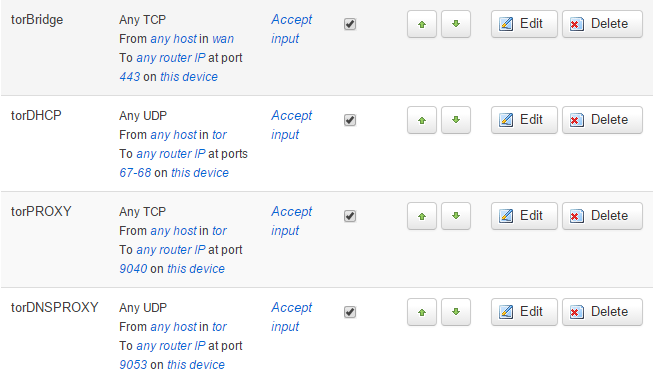
just for fun, let's see if we can get an WLAN set up that tunnels through tor. opkg install tor (duh!) first create a new wlan for tor in network>wifi add, and create a new network interface 'tor'. go to network>interfaces and configure our new interface with static ip and and a dhcp. assign a f irewall zone 'tor' . and if you're truly paranoid you can override the mac with  00:88:88:88:00:2A. head over to network>interfaces>firewall> select 'tor' and under advanced  and ensure ' force connection tracking ' is checked  (this connection tracking isn't required, when you don't use the --syn flag or use luci rules, see below) traffic rules  to setup are faily standard accept from wan   tcp   443 (torbridge) acccept from tor upd 67-68 (dhcp) accept from tor tcp 9040 (torproxy,  set port in /etc/tor/torrc) accept from tor udp 9053 (tordns, set port in /etc/tor/torrc) accept from tor tcp 9050 (tor ...

Wake-on-wan (good enough, but could be better)

Image
Stock Zyxel firmware has a wake-on-wan feature if I recall correctly. I don't recall how that setup worked but here's how to achieve similar functionality via openwrt. ! It does feel 'hacky' and not super clean either (all udp on port 9 gets mapped to the broadcast) but until i find a better solution this will have to do. under network>firewall>port forwards add a redirect rule upd port 9 form wan to a ' will-never-be-used ' local ip address, e.g. 10.0.0.253 then, from the CLI map this addr to the broadcast mac addr,  ip neigh add 10.0.0.253 lladdr ff:ff:ff:ff:ff:ff nud permanent dev br-lan You're done! ... but not quite. there are some pitfalls. the arp table can get flushed, e.g. interface changes, or reboot. You can add this line to rc.local, or as an init.d script or i supposes a procd script... but no info on what is best, hopefully more soon. the magic incantation above can fail of the ip is already known. I haven't found a...

QoS with SQM (and something about bufferbloat)

another feature that came with stock zyxel fw is their 'optimized' (the one with the 400mbps nag) QoS packages. As far as i can tell the standard SQM package should come pretty close. install uci-app-sqm a Network>SQM QoS menu item will appear check enable, double check your interface name is really your wan port(eth1), and set your down/up speeds to what you measured with e.g. dslreports . under linklayer adaptation set to Ethernet (for VDSL) with 8 bytes overhead. i reran the test, and it seems my up/down throughput dropped about 10%,  but my bufferbloat report went from D to B.... whatever that means in reality I'll have to find out :)